Download Private Facebook Videos Online
Tool to download Facebook private videos in Full HD, 1080p
How to download private videos on Facebook online
Download Facebook Private Video is a feature that allows you to download private videos on Facebook easily and quickly. Save and download Facebook videos privately directly on the web browser, no software installed. Support downloading private videos from Facebook in high quality: Full HD, 1080p, 2k, 4k (with sound).
Private Facebook videos are videos that the account owner has set to private mode. In this mode, only accounts that have been added as friends or granted permission can view the videos posted by that account. Downloading videos in private mode will be more complicated than public videos. Please follow the instructions below:
Note: Prioritize using SnapSave's private video download feature on your computer.
- Go to Facebook.com using a web browser → Find the video you want to download → Click on the posting time.

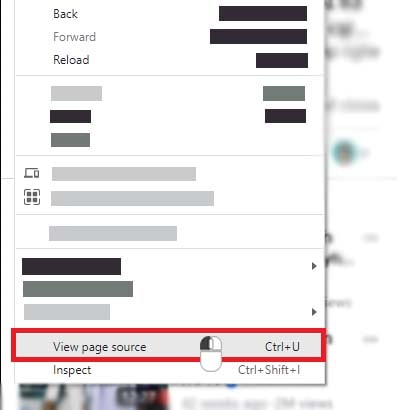
- Press Ctrl+U (Windows) or ⌘-Option-U (Mac) to view the page source code.
OR
Right click on any part of the page, then click the View page source option.
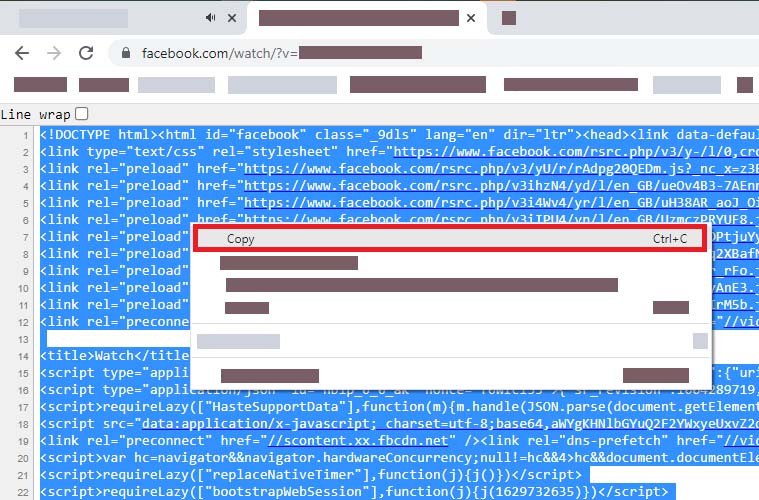
- Highlight all source code by pressing Ctrl + A (Windows) or ⌘ + A (Mac), then right-click and select "Copy".
- Go to https://snapsave.me/en/download-facebook-private (Download Facebook private videos) and paste the copied source code into the input box then press the "Download" button.
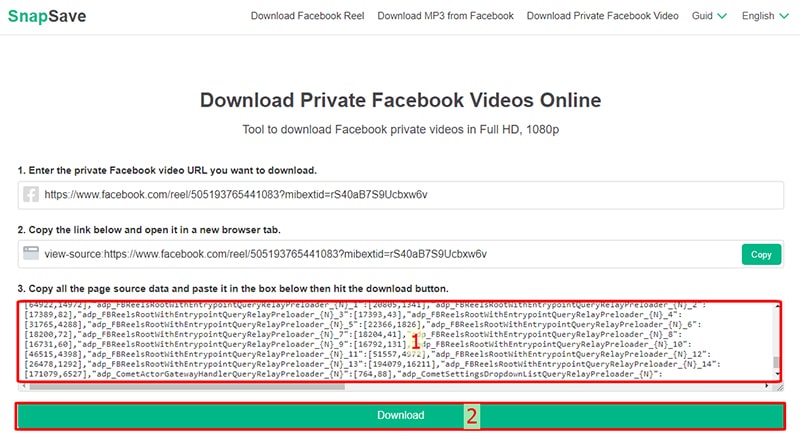
- Finally, press the Download or Render button and wait a few seconds for the file to download to your device.
Is it safe to download private videos on Facebook using SnapSave?
SnapSave.me does not collect user information, nor do we store videos nor keep copies of downloaded videos. The tool only supports Rendering videos with audio loss and does not store them. Therefore, using SnapSave is very safe.
Private Facebook Videos: For videos that are private or restricted by country, we cannot extract data in the usual way. You need to extract the video's data manually, so the download steps will be more complicated than for public videos.